==================================================
After installing VirusScan, you may logically wonder, how do I know if it's working? The answer is a test virus. The EICAR Standard AntiVirus Test File is a combined effort by anti-virus vendors throughout the world to implement one standard by which customers can verify their anti-virus installations.
seps for it:
-open your notepad & copy the following:
X5O!P%@AP[4\PZX54(P^)7CC)7}$EICAR-STANDARD-ANTIVIRUS-TEST-FILE!$H+H*
-now go to 'save as" option & select the "Save as Type" to "all files" instead of "Text document (*.txt) "
-save this file as a name: eicar.com
-Your antivirus start running automatically and configured correctly, when you try to save the file.
-your antivirus is ok else you have to change or update it.


How to disable "send error" report to microsoft....!!!
===================================================
Sometimes it happens that you are working on a pc and u get error message from microsoft regarding debugging-"send error/don't send" to microsoft. your running application may be closed if you click on don't send button.To disable the stupid feature in WinXP which tries to send a report to microsoft every time a program crashes you will have to do this:
-Open Control Panel
-Click on Preformance and Maintenance.
-Click on System.
-Then click on the Advanced tab
-Click on the error reporting button on the bottom of the windows.
-Select Disable error reporting.
-Click OK
Sometimes it happens that you are working on a pc and u get error message from microsoft regarding debugging-"send error/don't send" to microsoft. your running application may be closed if you click on don't send button.To disable the stupid feature in WinXP which tries to send a report to microsoft every time a program crashes you will have to do this:
-Open Control Panel
-Click on Preformance and Maintenance.
-Click on System.
-Then click on the Advanced tab
-Click on the error reporting button on the bottom of the windows.
-Select Disable error reporting.
-Click OK
Make your webpage like a Google...!!!
================================================
Hello friends, It is interesting you can see your own webpage like "Google" page. Few examples are shown below-


Click here, MyWebpage
What is Next-
Ok, you got your own Google MyWay page, so what can you do with it. Here are some suggestions:
-Bookmark it and use it every time you search Google
-Make this your default home page so that you can start your day with your own Google MyWay page
-Or, send your Google MyWay page url to your friends and make them wonder how it is possible.
Hello friends, It is interesting you can see your own webpage like "Google" page. Few examples are shown below-
Click here, MyWebpage
What is Next-
Ok, you got your own Google MyWay page, so what can you do with it. Here are some suggestions:
-Bookmark it and use it every time you search Google
-Make this your default home page so that you can start your day with your own Google MyWay page
-Or, send your Google MyWay page url to your friends and make them wonder how it is possible.
Make your webpage (/homepage) like Google ....!!!
================================================
Hello friends, It is interesting you can see your own webpage like "Google" page. Few examples are shown below-
Click here MyWebpage
What is Next-
Ok, you got your own Google MyWay page, so what can you do with it. Here are some suggestions:
-Bookmark it and use it every time you search Google
-Make this your default home page so that you can start your day with your own Google MyWay page
-Or, send your Google MyWay page url to your friends and make them wonder how it is possible.
Hello friends, It is interesting you can see your own webpage like "Google" page. Few examples are shown below-
Click here MyWebpage
What is Next-
Ok, you got your own Google MyWay page, so what can you do with it. Here are some suggestions:
-Bookmark it and use it every time you search Google
-Make this your default home page so that you can start your day with your own Google MyWay page
-Or, send your Google MyWay page url to your friends and make them wonder how it is possible.
How to speed up your Acrobat reader (almost like a notepad)?...!!!!
================================================
1. Go to the installation folder of acrobat reader
(C:\program files\adobe\acrobat\reader\.. whatever)
2. Move all the files and folders from the "plugins" directory to the "Optional" directory. (I repeat.. cut and paste the files NOT copy & paste).
Also make sure that acrobat reader is not open else it will lock the files and not allow you to move the files).
Now your acrobat reader will load very fast and almost as good as notepad.
1. Go to the installation folder of acrobat reader
(C:\program files\adobe\acrobat\reader\.. whatever)
2. Move all the files and folders from the "plugins" directory to the "Optional" directory. (I repeat.. cut and paste the files NOT copy & paste).
Also make sure that acrobat reader is not open else it will lock the files and not allow you to move the files).
Now your acrobat reader will load very fast and almost as good as notepad.
The Disappearing Google Logo- a Magic trick....!!!!!
Here's a magic trick to surprise your friends with. What they will see is
this: you are at the Google homepage, and you casually ask someone to
watch the Google logo. Then, you move two of your fingers to
completely cover the "o"s in the Google logo. When you remove your
fingers, to much surprise, the letters "o" will be missing from the logo.
Now you ask your friend to move her fingers over the missing "o"s.
After your friend removes the fingers, the logo will be complete again!
The trick here? It's not really the Google homepage you and your
friend are looking at - it's a fake page
(www.darkartsmedia.com/Google.html).
And when you click on the page, the letters of the logo will disappear
after five seconds. Clicking again will make them reappear after five
more seconds. So when you move your fingers to cover the Google
logo, simply click anywhere on the page, and wait a bit before you
remove your fingers... and when your friend covers the letters, you
click again. (A third click, by the way, will change the page to an actual
Google homepage so you can perform searches to "prove" the page is
real.)
this: you are at the Google homepage, and you casually ask someone to
watch the Google logo. Then, you move two of your fingers to
completely cover the "o"s in the Google logo. When you remove your
fingers, to much surprise, the letters "o" will be missing from the logo.
Now you ask your friend to move her fingers over the missing "o"s.
After your friend removes the fingers, the logo will be complete again!
The trick here? It's not really the Google homepage you and your
friend are looking at - it's a fake page
(www.darkartsmedia.com/Google.html).
And when you click on the page, the letters of the logo will disappear
after five seconds. Clicking again will make them reappear after five
more seconds. So when you move your fingers to cover the Google
logo, simply click anywhere on the page, and wait a bit before you
remove your fingers... and when your friend covers the letters, you
click again. (A third click, by the way, will change the page to an actual
Google homepage so you can perform searches to "prove" the page is
real.)
Orkut scrap notification through SMS on your mobile...!!!
================================================
Mobile market is booming in India and this for sure is ripe time to launch mobile based extended services.
Orkut has launched ‘Orkut SMS’ to the pleasure of their thousands of mobile hooked users. Orkut SMS allows you to receive new scrap notifications, get friend info and more from your mobile device.
Head to your Orkut account, check for ‘mobile’ tab under ’settings’ or go to ( http://www.orkut.co.in/MobileSetupSettings.aspx ) First you need to register your mobile number. Select your mobile carrier and enter your telephone number.
This service is supported mobile carriers: Aircel, BPL, MTNL, Reliance, Spice and Tata. Sadly, no Airtel and BSNL. Orkut SMS is a premium service and you will be charged by your mobile provider.
You can check for pricing details before registering your phone number. One cool feature for Orkut addicts to stay updated on the GO.
Mobile market is booming in India and this for sure is ripe time to launch mobile based extended services.
Orkut has launched ‘Orkut SMS’ to the pleasure of their thousands of mobile hooked users. Orkut SMS allows you to receive new scrap notifications, get friend info and more from your mobile device.
Head to your Orkut account, check for ‘mobile’ tab under ’settings’ or go to ( http://www.orkut.co.in/MobileSetupSettings.aspx ) First you need to register your mobile number. Select your mobile carrier and enter your telephone number.
This service is supported mobile carriers: Aircel, BPL, MTNL, Reliance, Spice and Tata. Sadly, no Airtel and BSNL. Orkut SMS is a premium service and you will be charged by your mobile provider.
You can check for pricing details before registering your phone number. One cool feature for Orkut addicts to stay updated on the GO.
Now make a file of the size you want...!!!
=========================================
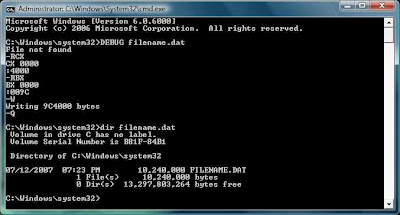
Let us assume you want to make a file of size 10000kb
Convert it to bytes -> 10000*1024 which comes out to be 10240000 bytes
Open calculator (win key+r -> type in calc )
Choose view mode to be Scientific one
Type in 10240000 and convert it to hex it comes out to be 9C4000
Convert this value to 8 digits by padding zeroes to its left -> so finally it comes out be 009C4000
Open Command Prompt (win key + r -> type in cmd )
Type DEBUG filename.dat
it'll show file not found error ,ignore it
Type RCX -> Enter -> then last four hexadecimal numbers i.e. 4000 ->Enter
Type RBX -> Enter -> then first four hexadecimal numbers i.e. 009C->Enter
Type W ->Enter
Type Q ->Enter
W stands for write and Q for quit
Now check the file you just made by dir command ->dir filename.dat
Using the same technique you can make files as big as you want.

Let us assume you want to make a file of size 10000kb
Convert it to bytes -> 10000*1024 which comes out to be 10240000 bytes
Open calculator (win key+r -> type in calc )
Choose view mode to be Scientific one
Type in 10240000 and convert it to hex it comes out to be 9C4000
Convert this value to 8 digits by padding zeroes to its left -> so finally it comes out be 009C4000
Open Command Prompt (win key + r -> type in cmd )
Type DEBUG filename.dat
it'll show file not found error ,ignore it
Type RCX -> Enter -> then last four hexadecimal numbers i.e. 4000 ->Enter
Type RBX -> Enter -> then first four hexadecimal numbers i.e. 009C->Enter
Type W ->Enter
Type Q ->Enter
W stands for write and Q for quit
Now check the file you just made by dir command ->dir filename.dat
Using the same technique you can make files as big as you want.
Subscribe to:
Posts (Atom)